There are so many ways to use WordPress, I don’t know where to begin. WordPress, as you may know, began as a blogging tool. But, for more reasons than I can explain, WordPress took off to become the primary Content Management System of our time. Almost any review you read rates it as the number one cms. For all of these reasons, I have primarily become a WordPress web designer.
When you are deciding on how to build your site, I will not say WordPress is the only solution. I have to admit that I started out working in a lesser known CMS called Concrete5 which appears in reviews as a great alternative to WordPress. Although less known and a smaller project, C5 has some things WordPress does not. It has a front end visual editor, which WordPress does not have. And, dropping in chunks code for the developer is more intuitive than WordPress. At first, this is what attracted me to Concrete5. But, like anything in life, the more you learn the less you know, and the more you get to learn about the endless opportunities for WordPress, the more you realize you can do so much more with it than any other CMS.
It is important to distinguish the different perspectives and uses people are going to have on WordPress. For example, you are going to have both clients without much technical knowledge and high end developers using WordPress. And, here is what makes WP so amazing, is it works for both of those people, and most everyone in between. Because I don’t want to write a book, basically there are two primary ways to use WordPress (I know I said many ways, but like I said, I don’t want to write a book). But for both kinds of users, most everything you use in WordPress is free.
1. The small business owner or person with a project who does not mind taking things in to their own hands and is on a budget
This is the person who can make with they need with what they are given. You search for a theme (visual design) and then you download it. You search for plugins and download a plugin every time you want a new features (slideshow, contact form, etc..). This process is great for non-coders, and people who just want to get an online presence up and aren’t too particular about the details. For these people, there are other options other than WP, such as Square Space, Wix, Weebly, etc… Even though they cost money, they are fantastic for brochure websites and simple shopping carts. In the end, you are going to spend a lot less money using these services than you are hiring a web designer, so use them if you are on a budget and willing to spend a little time figuring out the framework. WordPress takes a little more time to figure out, but the advantages are how expansive the system can be, if you are ambitious enough to learn it. Although WP has a very clean UX, these other options I mention, have fancier frameworks that are for the most part easier to learn.
So, if WordPress is harder to use than these commercial products that aren’t too expensive, why is WordPress so big and used by so many people?
There are too many reasons to list. WordPress is also a global community, and it is not only nice to connect with others, it is important for our happiness to connect with others. And, why not connect with others while you are building a website? It is amazing to me how generous people are online, not only with WordPress information, but all online information. You can ask almost any question in your search engine about WP and get an answer. You are not alone. Also, the themes and plugins have extended WP to do almost anything. If you can’t find a way with WP to accomplish your idea, you might want to reconsider your idea, and just how good it is.
2. The client and web developer who have custom projects and particular needs that don’t fit in to commercial products, or are too difficult for the web developer to do without a little help from WordPress.
This is where Schildbach Design predominantly works. I don’t want to spent my time downloading themes and plugins for someone. You can do that. I have learned the coding behind WordPress extensively, and am a designer. You are not going to find many people who can both code and design without hiring an expensive design firm. This is a great combination for accomplishing all kinds of projects, business identities, and online marketing for my clients. And, a reminder that I am connected with other great developers and creatives who can help me when the project is too large for me to do on my own. Here are just some items I have built custom for my clients:
- Slideshows
- Portfolios
- Designs you don’t see anywhere else
- Customizing content display with tabs, accordions, and popups
- Displaying large quantities of data
- Customizing search results
- Events calendars
- Membership websites
- Parallax Design
- Responsive Design
- Inserting instructions in the dashboard for my clients
- Shopping Carts
Being A WordPress Web Designer
To be honest with you, I would not be able to build these items without some help from WordPress. Another advantage is the client can update most items I build. WordPress has an amazing core that can get you started, then at the same time you are both building complex projects and making it editable for the client. Once you get to know WP well as a web developer, then modifying and customizing and building new items is the next level. I would recommend any web developer to learn the core of this CMS and then build with it. And, I would recommend any client with a project that has unique components to get a developer who codes in WordPress to make your ideas come to life. If you are a potential client, the important thing is to make sure the web developer knows the coding behind WordPress, not just raw coding languages (PHP, Javascript, etc…), and make sure the web designer who knows WordPress can code in PHP, jQuery, Javascript, etc… (they don’t even need to know it very well). Otherwise you are hiring someone who may not be able to get too much farther beyond the above mentioned way to use WordPress #1.

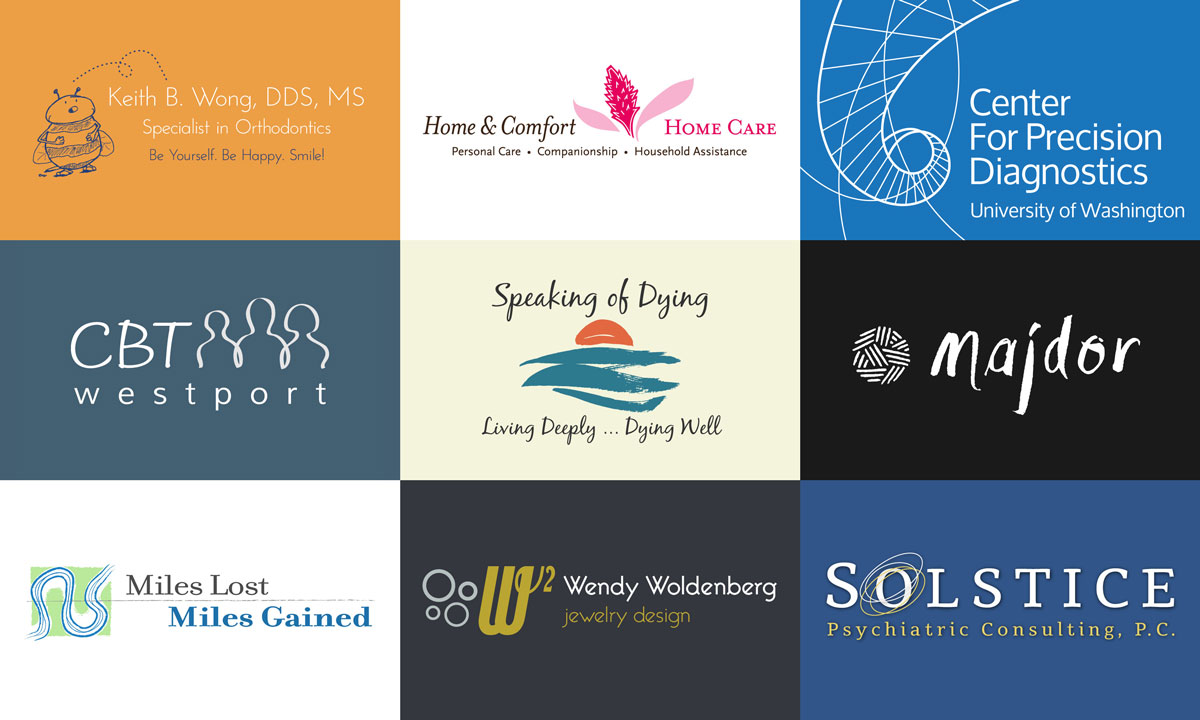
 Being a logo designer has two main challenges. The first is expressing a company’s essence in one simplistic graphic, the other is getting people to see the value and importance of a quality logo created by a professional graphic designer. The process of doing a logo takes several hours, because much more is involved than what appears on the surface. Logos are put under a microscope by the creator, the client and the public. I really enjoy making logos for my clients. One small disappointment I have faced more than once is being mistaken for being a web designer only, when I’m just as much of a logo designer. Clients sometimes will come to me with a logo from another graphic designer they hired without knowing that I have a longer history of being a logo designer, graphic designer and